

PM Surya Ghar Subsidy 2026: Complete Guide to Apply Online & Get ₹78,000
Meera from Jaipur installed a 3 kW rooftop solar system in January 2026 and received ₹78,000 directly in her bank account within 45 days. Her electricity bills dropped from ₹6,800 to just ₹800 per month. The best part? She completed the entire PM Surya Ghar subsidy application online in under 30 minutes without visiting any government office.
If you're planning to install rooftop solar panels, the PM Surya Ghar Muft Bijli Yojana (Free Electricity Scheme) can reduce your investment by up to 40%. This comprehensive guide walks you through every step of the online application process, eligibility criteria, required documents, and how to ensure you receive the full ₹78,000 subsidy without delays or rejections.
What is PM Surya Ghar Muft Bijli Yojana 2026?
PM Surya Ghar Muft Bijli Yojana is the Government of India's flagship rooftop solar scheme launched to provide free electricity to 1 crore households across India. Announced in the Union Budget 2024 and continuing strong in 2026, this scheme offers direct financial subsidies to homeowners who install rooftop solar panels on their residential properties.
The scheme is managed by the Ministry of New and Renewable Energy (MNRE) and implemented through state electricity distribution companies (DISCOMs). Unlike previous solar subsidy programs that had complicated procedures and delays, PM Surya Ghar uses a unified national portal for streamlined application and faster subsidy disbursement.
Key Benefits of the Scheme
Direct Bank Transfer: Subsidy amount is credited directly to your bank account within 30-90 days after successful installation and inspection. No intermediaries, no paperwork delays.
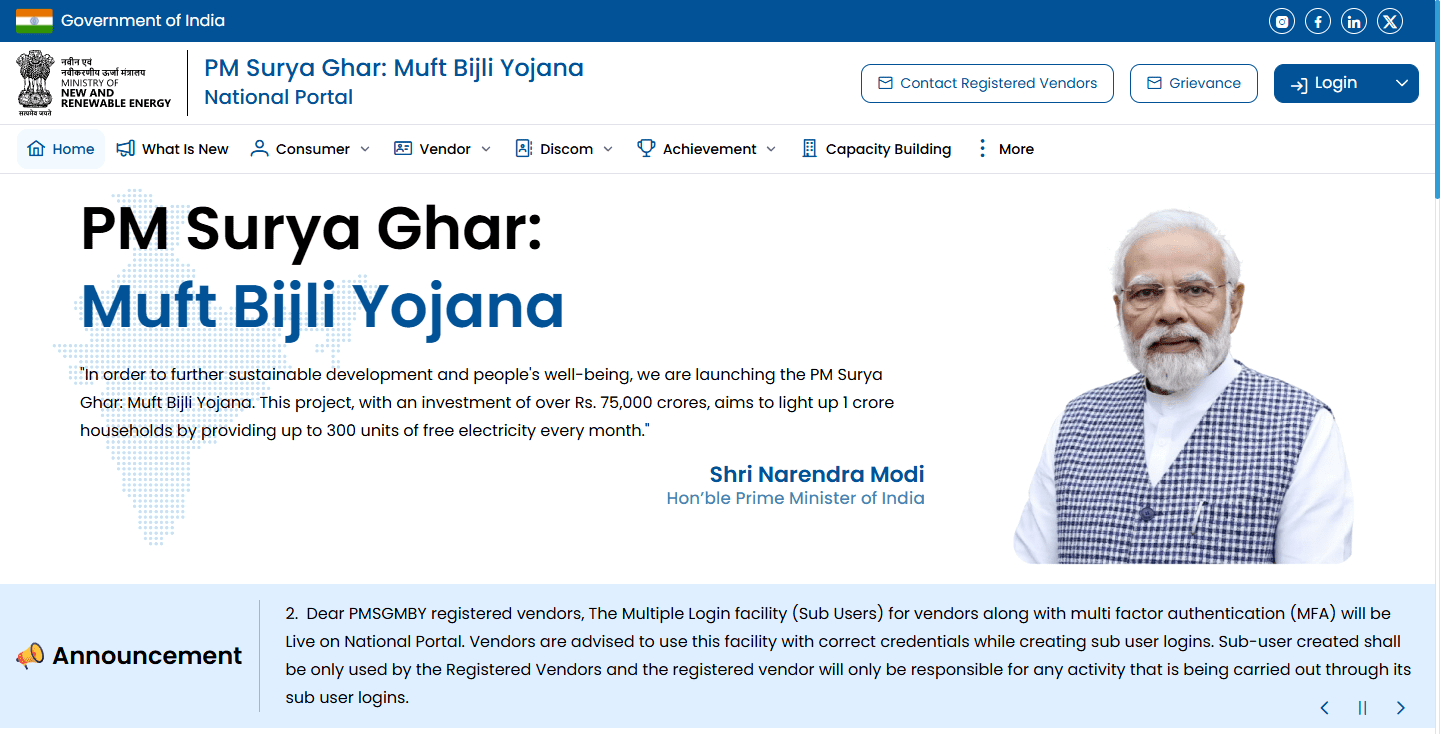
Simplified Process: Single window clearance through the national portal at pmsuryaghar.gov.in. You can complete registration, application, and tracking entirely online.
No Income Limit: Unlike many government schemes, there's no income ceiling for PM Surya Ghar. Whether you're middle-class or upper-middle-class, you qualify based on property ownership and system specifications.
Net Metering Included: The scheme includes net metering setup, allowing you to export excess solar electricity to the grid and earn credits on your bill.
25-Year Savings: Beyond the upfront subsidy, you'll save ₹6-10 lakh on electricity bills over 25 years, depending on your consumption and tariff rates.
Who is Eligible for PM Surya Ghar Subsidy?
The PM Surya Ghar subsidy eligibility criteria are straightforward but specific. You must meet all these conditions:
Property Ownership: You must own the residential property where solar panels will be installed. Rented properties don't qualify unless you have written consent from the owner and the electricity connection is in your name.
Residential Electricity Connection: You need an active residential electricity connection from the state DISCOM. Commercial or industrial connections are not eligible under this residential scheme.
System Size: Subsidy is available for rooftop solar systems from 1 kW to 10 kW capacity. Systems below 1 kW don't qualify. Systems above 3 kW receive the maximum subsidy of ₹78,000.
ALMM Compliance: Solar panels must be from the ALMM (Approved List of Models and Manufacturers) list. Non-ALMM panels are ineligible regardless of quality or price.
First-Time Applicant: If you've already received subsidy under any previous rooftop solar scheme at the same premises, you cannot reapply under PM Surya Ghar.
Grid-Connected System: Only grid-connected rooftop solar systems qualify. Standalone off-grid systems with batteries don't receive subsidies under this scheme.
Indian Citizen: The applicant must be an Indian citizen with valid identity proof and property documents.
PM Surya Ghar Subsidy Amount Breakdown
The subsidy structure is designed to encourage wider adoption by offering higher per-kW subsidies for smaller systems that typical households install.
Subsidy for 1 kW to 3 kW Systems
For the first 2 kW: You receive ₹30,000 per kilowatt, totaling ₹60,000 for 2 kW.
For the next 1 kW (2-3 kW): You receive ₹18,000 per kilowatt.
Maximum subsidy: ₹78,000 for 3 kW or larger systems.
Here's how it works for different system sizes:
1 kW system: You get ₹30,000 subsidy (₹30,000 × 1 kW). If your system costs ₹65,000, your net investment is ₹35,000.
2 kW system: You get ₹60,000 subsidy (₹30,000 × 2 kW). If your system costs ₹1,20,000, your net investment is ₹60,000.
3 kW system: You get ₹78,000 subsidy (₹60,000 for first 2 kW + ₹18,000 for next 1 kW). If your system costs ₹1,80,000, your net investment is ₹1,02,000.
4 kW system: You still get maximum ₹78,000 subsidy. If your system costs ₹2,40,000, your net investment is ₹1,62,000.
5 kW or larger: Maximum subsidy remains ₹78,000 regardless of system size beyond 3 kW.
The subsidy percentage typically works out to 35-45% of total system cost for 2-3 kW systems, which are most popular among Indian households.
Additional State Government Benefits
Several states offer additional incentives on top of the central PM Surya Ghar subsidy:
Gujarat: Farmers and rural households get an extra ₹10,000 per kW up to 3 kW under the state's Suryashakti Kisan Yojana when combined with PM Surya Ghar.
Rajasthan: SC/ST households receive 30% additional state subsidy on the remaining cost after central subsidy.
Haryana: Provides expedited net metering approval within 15 days for PM Surya Ghar applicants.
Punjab: Offers generation-based incentives of ₹1.50 per unit for the first three years in addition to the central subsidy.
Uttarakhand: Hill district residents get priority processing and additional ₹5,000 for transportation and installation challenges.
Check your state nodal agency's website or the state section on pmsuryaghar.gov.in for current additional schemes. These benefits can reduce your net investment by another 10-20%.
Documents Required for PM Surya Ghar Application
Having all documents ready before starting your application prevents delays and rejections. The document requirements are minimal but mandatory.
Mandatory Documents Checklist
Aadhaar Card: Your Aadhaar number is mandatory for registration and subsidy disbursement. You'll need to verify it through OTP during application. Aadhaar seeding with your bank account is essential for direct benefit transfer.
Electricity Bill: Recent electricity bill (not older than 2 months) showing your consumer number, sanctioned load, and property address. The address on the bill must match your property documents.
Bank Account Details: Bank account number, IFSC code, and a canceled cheque or bank passbook copy. The account must be in the applicant's name and should be Aadhaar-seeded.
PAN Card: While not mandatory for all states, most DISCOMs require PAN card for subsidy amounts above ₹50,000 for tax purposes.
Mobile Number: Active mobile number for OTP verification and application status updates. This number will receive SMS notifications at each application stage.
Email Address: Valid email ID for application confirmation, installation certificate, and subsidy credit notifications.
Property and Identity Proof Requirements
Property Ownership Proof: Any one of these documents - Property tax receipt, Sale deed, Patta document, Registered lease agreement (if applicable), or Society maintenance bill showing ownership.
Photograph: Passport-size photograph of the applicant for the profile. Some states also require a photograph of the installation site before and after solar setup.
Self-Declaration: You'll digitally sign a self-declaration during application confirming property ownership, no previous subsidy received, and willingness to maintain the system.
Installation Documents (After Installation): MNRE-empaneled installer's completion certificate, Net metering approval from DISCOM, and Commissioning report with system specifications.
Keep scanned copies of all documents in PDF or JPG format, each under 500 KB in size, for smooth online upload.
How to Apply for PM Surya Ghar Subsidy Online (Step-by-Step)
The PM Surya Ghar application process has four main stages. Most applicants complete stages 1 and 2 before installation, then stages 3 and 4 after installation and inspection.
Step 1: Register on National Portal
Visit the official portal: Go to pmsuryaghar.gov.in using Chrome, Firefox, or Edge browser. Avoid using VPN or incognito mode as OTP verification may fail.
Click on "Apply for Rooftop Solar": You'll find this button prominently on the homepage. It redirects you to the registration page.
Enter your details: Provide your state, electricity distribution company (DISCOM), consumer account number (from electricity bill), and mobile number.
Verify consumer details: The portal automatically fetches your name, address, and sanctioned load from DISCOM records. Verify this information matches your current electricity bill.
Complete Aadhaar verification: Enter your Aadhaar number and verify it through OTP sent to your Aadhaar-linked mobile number. If your mobile number isn't linked to Aadhaar, visit the nearest Aadhaar center first.
Create login credentials: Set a strong password for your account. You'll use your registered mobile number and this password for future logins.
Complete profile: Upload your photograph, enter bank details, and upload required documents like canceled cheque and property proof.
Submit registration: Review all details carefully and submit. You'll receive a registration confirmation on your mobile and email with your unique applicant ID.
This registration process takes 15-20 minutes. Your applicant ID is crucial for all future communications, so save it securely.
Step 2: Submit Feasibility Application
After registration approval (usually within 24-48 hours), log in again to submit your feasibility application:
Log in to portal: Use your registered mobile number and password to access your dashboard.
Select system capacity: Choose your desired solar system size (1 kW, 2 kW, 3 kW, etc.). The portal shows your subsidy amount based on this selection.
Choose installation mode: Select either "Through Vendor" (installer arranges everything) or "Self-Installation" (you arrange components and installation yourself, though vendor mode is recommended for hassle-free subsidy).
Select MNRE vendor: If choosing vendor mode, select from the list of MNRE-empaneled installers in your area. You can compare their ratings and previous installation counts on the portal.
Technical details: Provide roof type (RCC/sloped/asbestos), available roof area in square feet, and any shading issues. This helps in feasibility assessment.
Submit feasibility request: Click submit. Your request goes to the DISCOM for technical feasibility assessment.
Feasibility approval: Within 5-15 days, DISCOM engineers assess whether your property is suitable for rooftop solar of the requested capacity. They check roof strength, shadow-free area, and grid infrastructure.
Receive feasibility report: Once approved, you receive a feasibility certificate on your portal dashboard and via email. This certificate includes net metering approval in principle and clearance to proceed with installation.
If feasibility is rejected due to roof issues or grid capacity constraints, you can modify your application with a smaller system size or address technical concerns raised.
Step 3: Installation and Inspection
After feasibility approval, you proceed with physical installation:
Finalize vendor agreement: If using vendor mode, finalize payment terms with your selected MNRE-empaneled installer. Never pay 100% upfront; standard practice is 30-40% advance, 40-50% during installation, and 10-20% after subsidy credit.
Installation begins: The installer completes mounting structure, panel installation, inverter setup, and wiring within 15-30 days depending on system size and roof complexity.
Net metering installation: DISCOM installs a bidirectional net meter that records both grid import and solar export. This usually happens within 7-15 days of installation completion request.
Upload installation proof: Log in to PM Surya Ghar portal and upload installation completion certificate from your vendor, photographs of installed system (panels, inverter, meter), and commissioning report with system specifications.
Request DISCOM inspection: Submit inspection request through the portal. DISCOM assigns an engineer to visit your site.
Physical inspection: DISCOM engineer visits within 7-20 days to verify installation quality, system specifications, and compliance with safety standards. They check panel model against ALMM list, proper earthing, and net metering setup.
Inspection certificate upload: After successful inspection, DISCOM uploads the inspection and commissioning certificate on the portal. This triggers the subsidy disbursement process.
If inspection finds issues (wrong panel model, improper installation, safety violations), you must rectify them before reapplying for inspection. Choose quality installers to avoid such problems.
Step 4: Subsidy Disbursement
This is the final stage where you receive your ₹78,000 subsidy:
Automatic subsidy processing: Once DISCOM uploads the successful inspection certificate, the subsidy claim is automatically processed by the MNRE system. No separate subsidy application is needed.
Verification by DISCOM: Your DISCOM verifies final system capacity, installation quality, and subsidy eligibility within 5-10 days.
MNRE approval: MNRE reviews and approves the subsidy claim based on DISCOM verification. This takes 10-20 days.
Direct bank transfer: The subsidy amount (₹78,000 for 3 kW or larger systems) is transferred directly to your Aadhaar-seeded bank account through DBT (Direct Benefit Transfer).
SMS and email notification: You receive confirmation messages once subsidy is credited with transaction reference number.
Total timeline: From inspection certificate upload to subsidy credit typically takes 30-60 days. In some states with efficient DISCOMs, it happens within 20-30 days.
Track your subsidy: Log in to your PM Surya Ghar dashboard anytime to check subsidy status. It shows stages like "Inspection Completed," "Subsidy Processing," "Approved," and "Disbursed."
PM Surya Ghar Application Process Through Vendor
Most homeowners choose the vendor-assisted mode because it simplifies the technical process and ensures compliance with all requirements.
Choosing MNRE Empaneled Installer
When you select "Through Vendor" mode on the PM Surya Ghar portal, you see a list of MNRE-empaneled installers operating in your district. The portal shows:
Vendor rating: Based on previous customer feedback and installation quality scores.
Installations completed: Number of successful PM Surya Ghar installations by that vendor.
Contact details: Phone number and email to directly connect with the installer.
System cost: Approximate cost range they charge for different system sizes.
Before finalizing, interview at least 3-4 vendors from the list. Ask about:
Total cost including GST: Get written quotations with component-wise cost breakdown.
Brands they use: Ensure panels are ALMM-certified and inverters are from reputed brands.
Warranty terms: 25 years for panels, 5-10 years for inverter, 5 years for mounting structure.
Payment schedule: Never pay 100% upfront. Insist on payment in phases tied to milestones.
Post-installation support: Annual maintenance, cleaning services, and complaint resolution process.
Timeline: How long from work order to subsidy credit. Experienced vendors complete the entire process in 60-90 days.
Vendor-Assisted Application Benefits
Technical expertise: Vendors handle system sizing, roof assessment, structural calculations, and compliance documentation.
Portal navigation: They assist with online application, document uploads, and status tracking, though you maintain control of your account.
DISCOM coordination: Vendors coordinate with DISCOM for net metering approval, meter installation, and inspection scheduling.
Quality assurance: MNRE-empaneled vendors have mandatory quality standards and face delisting if customer complaints pile up.
Faster subsidy: Experienced vendors know exactly what DISCOMs expect during inspection, reducing rejection chances and delays.
After-sales service: They handle warranty claims, system monitoring, and troubleshooting.
The vendor typically charges ₹3,000-₹8,000 extra as facilitation fees for handling the subsidy process, but this is worth it for hassle-free experience.
Common Mistakes to Avoid While Applying
Learning from others' errors saves you time and prevents application rejection:
Mistake 1 - Wrong consumer number: Double-check your electricity consumer number from a recent bill. One wrong digit and the portal won't fetch your details.
Mistake 2 - Non-ALMM panels: Some installers offer cheaper non-ALMM panels. You'll save ₹10,000-₹15,000 on equipment but lose ₹78,000 in subsidy. Always verify panel model on the ALMM list before installation.
Mistake 3 - Mismatched documents: Address on Aadhaar, electricity bill, and property papers must match. Even minor differences (apartment number, street name spelling) cause rejections.
Mistake 4 - Installing before feasibility: Some homeowners install solar before completing feasibility application, then face rejection if DISCOM denies technical feasibility. Always wait for feasibility approval before starting installation.
Mistake 5 - 100% upfront payment to installer: Vendors who demand full payment before installation often delay subsidy documentation. Pay in phases: advance, during installation, and balance after subsidy credit.
Mistake 6 - Wrong system capacity claim: Installing 2.8 kW but claiming 3 kW to get higher subsidy. DISCOM inspection catches this, leading to rejection and potential blacklisting.
Mistake 7 - Incomplete documentation: Missing even one document (like canceled cheque or property proof) stalls your application at submission stage.
Mistake 8 - Ignoring portal updates: DISCOMs often request additional information or clarification through portal notifications. Check your dashboard weekly and respond promptly.
Mistake 9 - Using agents for documentation: Third-party agents charge ₹5,000-₹10,000 to "process" your subsidy, but the online portal is designed for self-application. Save this money; apply yourself.
Mistake 10 - Not tracking application: After installation, homeowners assume subsidy will automatically come. Actively track status and follow up with DISCOM if any stage crosses the standard timeline.
PM Surya Ghar Subsidy Approval Timeline
Understanding realistic timelines helps you plan finances and hold vendors accountable.
How Long Does Subsidy Take to Credit?
Registration to feasibility approval: 5-15 days (varies by DISCOM efficiency)
Installation after feasibility approval: 15-30 days (depends on vendor and roof complexity)
Net metering installation: 7-15 days after installation completion
DISCOM inspection scheduling: 7-20 days after inspection request submission
Inspection to inspection certificate upload: 3-7 days
Subsidy processing and approval: 20-40 days after inspection certificate
Bank credit: 3-5 days after MNRE approval
Total timeline from registration to subsidy credit: 60-120 days
In well-performing states like Gujarat, Rajasthan, and Karnataka, the average timeline is 60-75 days. In states with DISCOM inefficiencies, it can extend to 90-120 days.
The government has set a target of 45-day subsidy disbursement from inspection, but actual timelines vary by state.
Tracking Your Application Status
Log in to pmsuryaghar.gov.in and check your dashboard. Application status shows these stages:
Registered: Your initial registration is complete and under DISCOM review.
Feasibility Approved: DISCOM has cleared your property for rooftop solar installation.
Installation Completed: You've uploaded installation proof and requested inspection.
Inspection Scheduled: DISCOM engineer appointment is confirmed.
Inspection Passed: Your system meets all quality and compliance standards.
Subsidy Under Process: MNRE is processing your subsidy claim.
Subsidy Approved: Payment approved and being transferred.
Subsidy Disbursed: Money credited to your bank account.
If any stage shows "Action Required" or "Pending Information," click it to see what's needed from your end.
For escalation, each state has a PM Surya Ghar nodal officer whose contact details are on the portal. Escalate only if timeline exceeds 15 days beyond the standard duration for that stage.
Troubleshooting and FAQs
What If Application Gets Rejected?
Rejection at feasibility stage: Common reasons include roof area insufficient for requested capacity, structural weakness, or grid capacity constraints. You can reapply with a smaller system size or after addressing structural issues.
Rejection at inspection stage: Usually due to non-ALMM panels, incorrect system specifications, or safety compliance failures. Rectify the specific issues mentioned and request re-inspection.
Subsidy claim rejection: Happens if documents are inconsistent or installation doesn't match approved feasibility. Correct the discrepancies and resubmit through your vendor.
You have 3 attempts to clear any stage. After 3 rejections, you must withdraw and start fresh application, which resets your timeline.
Can I Apply Without Installing Solar First?
Yes, and this is actually the recommended approach. The PM Surya Ghar process is designed for you to apply first, get feasibility approval and subsidy pre-approval, then install.
Applying before installation ensures you get official clearance, subsidy confirmation, and avoid installing a system that might get rejected later. The sequence is: Register → Feasibility approval → Install → Inspection → Subsidy.
Some homeowners who installed solar before the PM Surya Ghar scheme launched have faced challenges retrofitting their applications. If you've already installed, contact your DISCOM's nodal officer for guidance on backdated applications, though success isn't guaranteed.
Can I install more capacity than applied for? You can, but subsidy will be calculated only for the approved capacity. If you applied for 3 kW but installed 5 kW, you still get ₹78,000 (the 3 kW subsidy), not any additional amount.
What if I relocate after installation? Subsidy is tied to the property and electricity connection, not the person. If you sell the property, the new owner benefits from the solar system, but subsidy money goes to whoever's bank account was registered in the application.
Can tenants apply? Only if the electricity connection is in the tenant's name and they have written permission from the property owner. Most DISCOMs require a notarized consent letter from the owner.
Do I need to pay income tax on subsidy? As per current tax laws, government subsidies for renewable energy are exempt from income tax. However, consult a CA for latest tax treatment as rules can change.
What happens if panels get damaged? Panel warranty covers manufacturing defects, not physical damage from storms, falling objects, or vandalism. Consider solar insurance (₹3,000-₹5,000 annually) that covers such risks. Subsidy won't be refunded even if panels are damaged later.
Conclusion
Applying for the PM Surya Ghar subsidy in 2026 is straightforward when you follow the correct process. Register on pmsuryaghar.gov.in, get feasibility approval, install through an MNRE-empaneled vendor, pass DISCOM inspection, and receive ₹78,000 directly in your bank account within 60-90 days.
Key takeaways: Ensure your documents match exactly, choose only ALMM-certified panels, work with experienced empaneled installers, and actively track your application status. The subsidy reduces your 3 kW system cost from ₹1,80,000 to just ₹1,02,000, with a payback period of only 3-4 years.
Ready to start your solar journey? Visit pmsuryaghar.gov.in today, complete your registration, and join the 45 lakh Indian families already generating free electricity from their rooftops. Every month you delay costs you ₹3,000-₹5,000 in electricity bills that solar could have eliminated.


