

You submitted your PM Surya Ghar Muft Bijli Yojana application three weeks ago. Since then, you have been checking your phone daily, wondering: Has my DISCOM approved feasibility? When will I get the ₹78,000 subsidy? Did my bank details go through correctly? For the 1.5 crore+ Indian families who have applied for this solar subsidy in 2026, these questions create genuine anxiety.
The good news: The PM Surya Ghar portal (pmsuryaghar.gov.in) provides complete transparency. You can track every stage of your application—from initial submission to final subsidy credit—right from your mobile or laptop. The challenge? The portal interface can be confusing, status messages are not always clear, and login issues often frustrate first-time users.
This step-by-step guide explains exactly how to check PM Surya Ghar subsidy status online in 2026, what each application stage means, expected timelines, how to track your DBT payment, troubleshooting common login errors, and what to do if your subsidy is delayed. Applicable for all Indian states and DISCOMs.
How to Check PM Surya Ghar Application Status Online (Step-by-Step)
The official PM Surya Ghar national portal is the only authentic source for checking your application status. Follow these steps carefully:
Method 1: Via Desktop/Laptop (Portal Website)
1. Open your web browser and visit the official website: https://pmsuryaghar.gov.in
2. On the homepage, click the 'Consumer Login' button (usually located in the top-right corner or center of the page)
3. Enter your registered Mobile Number (the one you used during application)
4. Enter your Consumer Account ID / Consumer Number (found on your electricity bill)
5. Click 'Send OTP' — A 6-digit OTP will be sent to your registered mobile number via SMS
6. Enter the OTP within 5 minutes and click 'Verify' or 'Login'
7. Your consumer dashboard will open, displaying your current application status prominently at the top
2026 Update: Sandes App OTP
If you do not receive the SMS OTP within 2-3 minutes, check the Sandes App (Government of India's official messaging app, available on Google Play Store). In 2026, many OTPs are being sent via Sandes to reduce SMS delivery failures. Install the app before logging in if you face OTP delays.
Method 2: Via PM Surya Ghar Mobile App (Android)
8. Download the 'PM - SURYA GHAR' app from Google Play Store (updated January 2026)
9. Open the app and tap 'Consumer Login'
10. Enter your Mobile Number and Consumer Account ID
11. Verify OTP (same process as desktop)
12. Your application status will display on the app dashboard
The mobile app is particularly useful if you are experiencing 'Session Expired' errors on the desktop portal. It also sends push notifications when your application status changes.
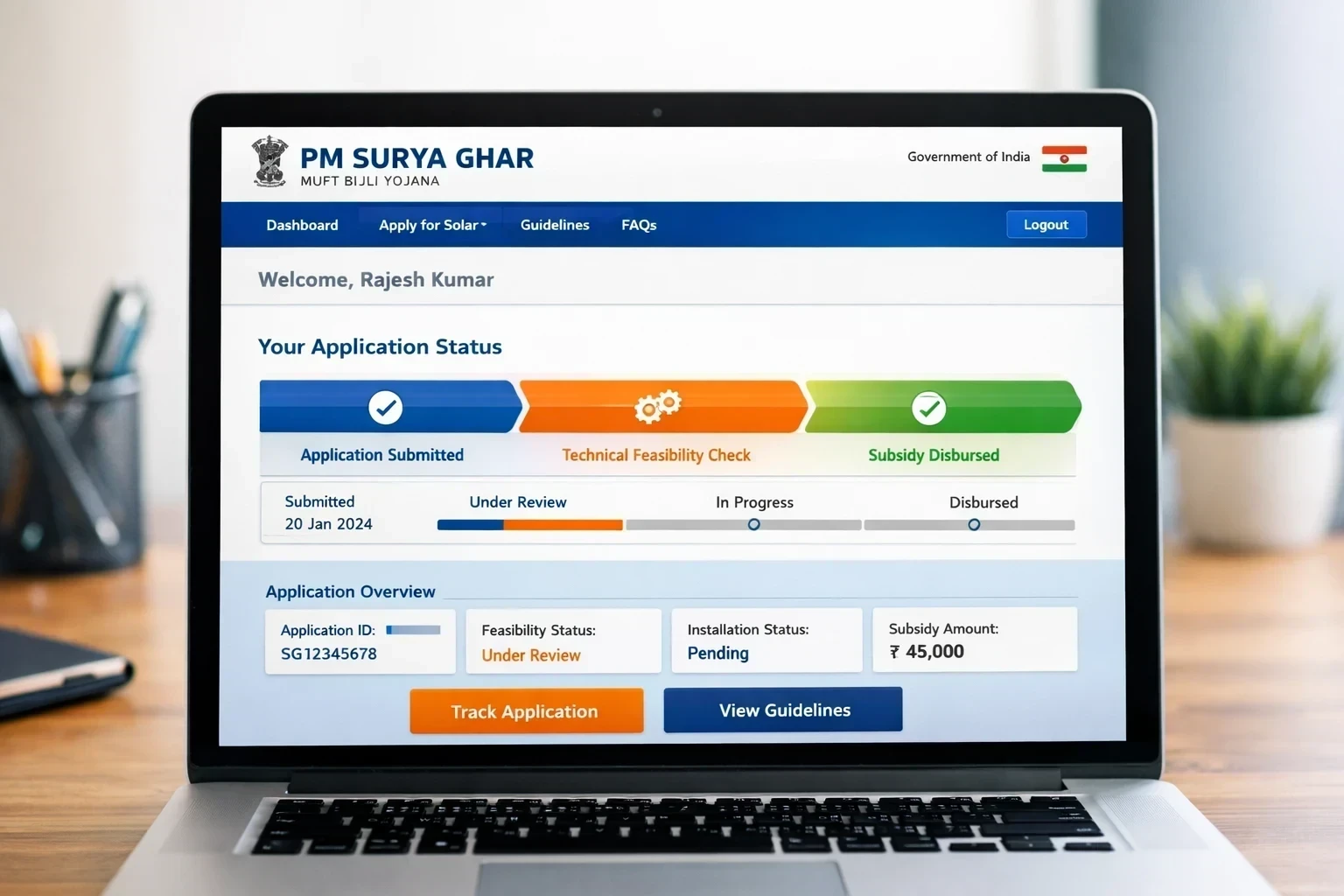
Understanding PM Surya Ghar Application Stages: What Each Status Means
Once you log in, your dashboard will display one of these status messages. Here is what each stage means, the typical timeline, and what action you need to take next:
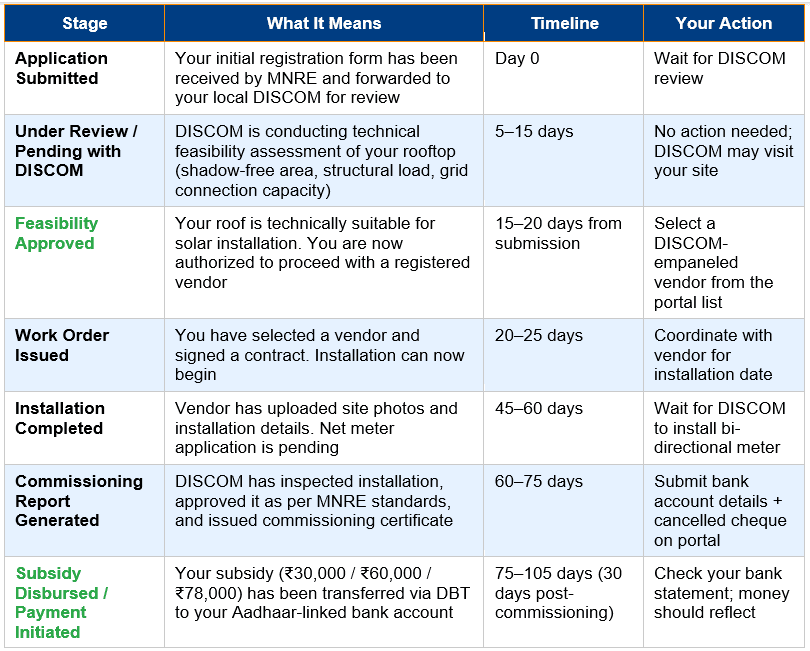
Note: Timelines are approximate and vary by state/DISCOM workload. Delhi, Gujarat, and Kerala typically process faster (60–75 days total). UP, Bihar, and Rajasthan may take 90–120 days due to higher application volume.
Common Confusion: 'Feasibility Approved' ≠ Subsidy Approved
Many applicants mistakenly think feasibility approval means their subsidy money is coming soon. Not true! Feasibility approval only means your roof is suitable for solar. You still need to: (1) install the system, (2) get DISCOM inspection/commissioning, (3) submit bank details. Only then does subsidy disbursal happen—typically 30 days after commissioning certificate.
How to Track PM Surya Ghar Subsidy Payment (DBT Status)
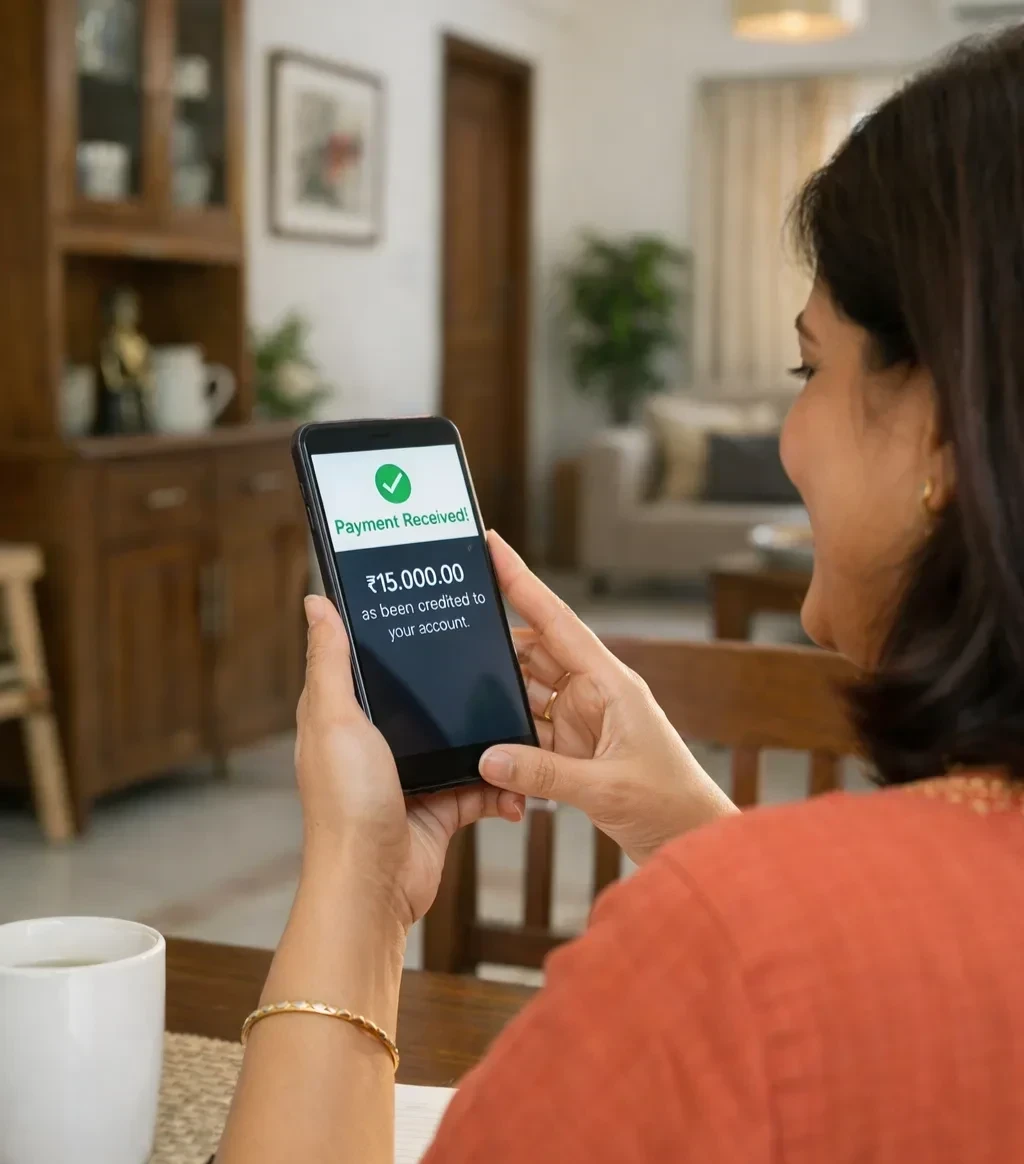
Once the status changes to 'Subsidy Disbursed' or 'Payment Initiated', your subsidy has been sent via Direct Benefit Transfer (DBT) to your Aadhaar-linked bank account. Here is how to verify the payment:
Step 1: Check Your Bank Account Statement
Log in to your bank's net banking or mobile app (e.g., SBI YONO, HDFC Mobile, Paytm Payments Bank). Look for a credit transaction with description: 'MNRE SUBSIDY' or 'PM SURYA GHAR' or 'ROOFTOP SOLAR DBT' within 24–72 hours of portal status update.
Step 2: Use PFMS Portal (Public Financial Management System)
For official government payment tracking:
13. Visit https://pfms.nic.in
14. Click 'Know Your Payment' under Beneficiary Services
15. Enter your Bank Account Number + Captcha Code
16. Submit — If your subsidy has been processed, it will show transaction details including date and amount
Step 3: Check DBT Bharat Portal
Alternative official tracking:
17. Visit https://dbtbharat.gov.in
18. Click 'Know Your Payment Status'
19. Select scheme: 'Ministry of New and Renewable Energy – PM Surya Ghar'
20. Enter your Aadhaar number or Bank Account number
21. View payment history
Why 30-Day Timeline?
Government DBT payments follow a multi-stage approval process: (1) DISCOM uploads commissioning report to MNRE portal → (2) MNRE verifies technical compliance → (3) Finance wing approves fund release → (4) PFMS transfers to your bank. This typically takes 20–30 working days. If i t exceeds 45 days, escalate (see troubleshooting section).
PM Surya Ghar Login Issues: Common Errors & Solutions (2026 Update)
Portal errors are frustrating but usually fixable. Here are the most common login problems and their solutions:
Error 1: 'Consumer Not Yet Registered' or 'Invalid Consumer ID'
Causes & Fixes:
• Cause: You are entering the wrong Consumer Account ID (electricity bill number varies by DISCOM—some use 10 digits, others 12-14)
• Solution: Check your latest electricity bill. Enter the exact Consumer Number as printed (no spaces, no dashes)
• Cause: Your registration is incomplete—you started the form but did not submit it
• Solution: Re-register from scratch on pmsuryaghar.gov.in homepage. Do NOT try to login before completing registration
Error 2: 'OTP Not Received' or 'OTP Expired'
Causes & Fixes:
• Cause: SMS gateway delay or DND (Do Not Disturb) active on your number
• Solution: Check Sandes App (Government messaging app) for OTP. If still not received, wait 10 minutes and request new OTP
• Cause: You entered wrong mobile number during registration
• Solution: Contact your DISCOM helpline to update mobile number on file (see helpline list below)
Error 3: 'Session Expired' or 'Portal Timeout'
Causes & Fixes:
• Cause: Portal server overload (common during peak hours 10 AM – 2 PM)
• Solution: Try accessing the portal between 6 AM – 9 AM or after 8 PM. Use Incognito/Private browsing mode
• Solution: Download the PM Surya Ghar Mobile App (Android) — app has better session management than desktop portal
Error 4: 'Account ID Already Exists But Can't Login'
Causes & Fixes:
• Cause: Registration was started but never completed (stuck at bank details or document upload stage)
• Solution: Call your DISCOM helpline or MNRE toll-free number 1800-180-6023 to reset your account
• Alternate: Try logging in as 'Vendor' instead of 'Consumer' accidentally during first registration (some users selected wrong category)
Error 5: Dashboard Shows No Application Found
Causes & Fixes:
• Cause: Application was submitted but not saved properly (network interruption during submission)
• Solution: Re-submit application. Check your registered email for confirmation mail from pmsuryaghar@gmail.com
• Cause: Wrong DISCOM selected during registration (e.g., selected TATA Power but you are actually under MSEDCL in Mumbai)
• Solution: Verify your DISCOM from electricity bill and re-register with correct DISCOM
What to Do If Your PM Surya Ghar Subsidy Is Delayed
If it has been more than 45 days since commissioning report and your subsidy status still shows 'Pending' or 'Under Review', take these escalation steps:
Step 1: Verify Bank Details on Portal
Log in to your dashboard → Click 'Bank Details' section → Confirm that:
• Account number is correct (no typos)
• IFSC code matches your bank branch exactly
• Account holder name matches Aadhaar name (DBT will fail if names do not match)
• Cancelled cheque was uploaded clearly (photo not blurry)
Step 2: Contact Your DISCOM Customer Care
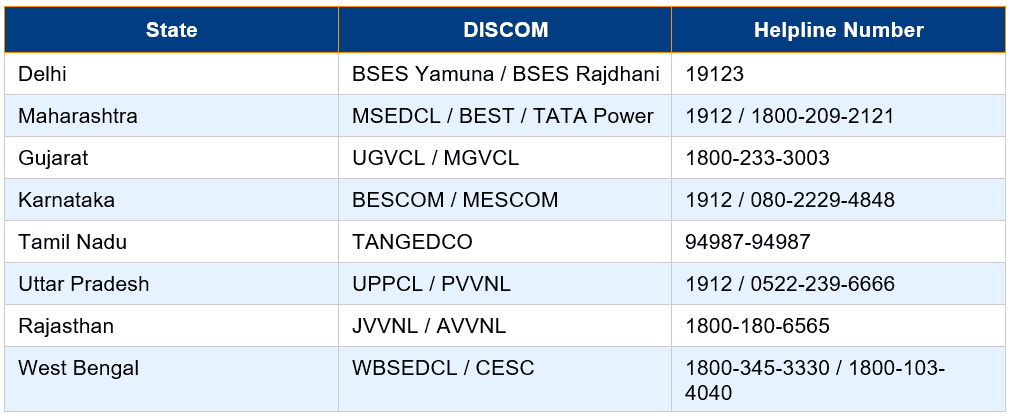
Each state DISCOM has a dedicated PM Surya Ghar helpline. Call them with your Consumer Number and Application ID. Ask them to check if commissioning report has been uploaded to MNRE portal.
Major DISCOM Helpline Numbers (2026)
Step 3: Email MNRE Grievance Cell
If DISCOM does not respond within 7 days, escalate to MNRE:
• Email: pmsuryaghar-mnre@gov.in or solarrooftop-mnre@gov.in
• Subject line: 'Subsidy Payment Delay – Application ID [Your ID] – Consumer [Your Name]'
• Attach: Screenshot of portal status, commissioning certificate, bank details proof
• Mention: Days elapsed since commissioning (e.g., '65 days since commissioning report, no payment received')
Step 4: Toll-Free Helpline (Last Resort)
National PM Surya Ghar Helpline: 1800-180-6023 (Monday–Saturday, 9 AM – 6 PM)
Keep ready: Consumer Number, Application ID, Commissioning Certificate Number, and Bank Account details. Expect resolution within 15 working days after escalation.
Realistic Expectation
In 2026, 85% of subsidies are credited within 30 days of commissioning. The remaining 15% face delays due to: bank account mismatch, incomplete documentation, DISCOM portal upload errors, or MNRE budget release delays at month-end. Escalation usually resolves the issue within 2–3 weeks.
Complete PM Surya Ghar Application to Subsidy Timeline (2026)
Here is a realistic end-to-end timeline based on 2026 data from fastest and slowest performing states:
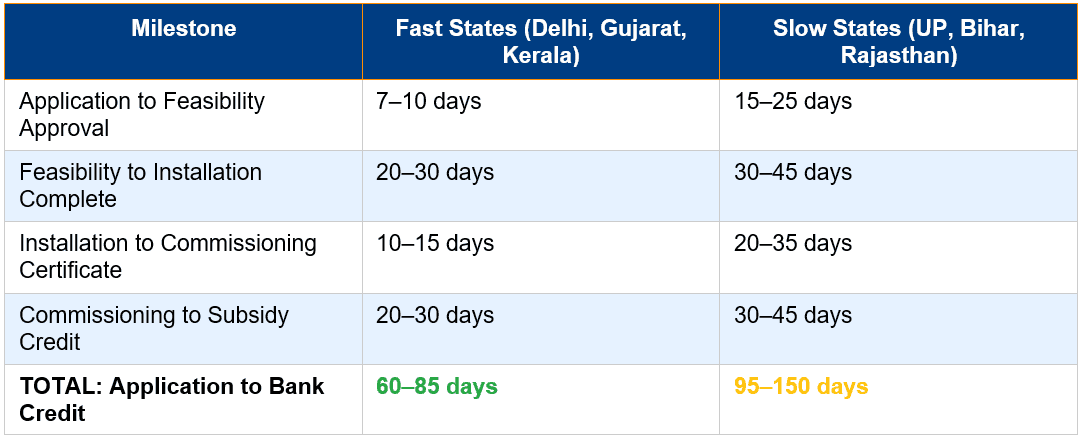
Pro Tip: Apply during October–January for fastest processing. April–July sees highest application volume due to summer heat, causing DISCOM delays.
Conclusion & Key Takeaways
Checking your PM Surya Ghar subsidy status online is straightforward once you understand the portal workflow. Log in via pmsuryaghar.gov.in or the mobile app using your Consumer Number + registered mobile. Track your application through 7 stages: Submission → Feasibility → Work Order → Installation → Commissioning → Subsidy Disbursed. Typical timeline is 60–90 days start to finish.
Quick recap: Use Sandes App if OTP fails. 'Feasibility Approved' does NOT mean money is coming—you still need installation and commissioning. Subsidy payment via DBT takes 30 days post-commissioning. Check PFMS.nic.in to track DBT. If delayed beyond 45 days, escalate to DISCOM helpline → MNRE email → Toll-free 1800-180-6023. Ensure bank account name matches Aadhaar exactly (common delay cause).
The government has successfully disbursed ₹12,000+ crore in subsidies to 15 lakh+ households in 2025–26. The system works—but it requires patience and attention to detail. Stay proactive, check your status weekly, and escalate promptly if needed. Your ₹78,000 is coming!
Frequently Asked Questions (FAQ Schema)
Q: How long does it take to receive PM Surya Ghar subsidy after installation?
A: After your solar system is installed and the DISCOM issues a commissioning certificate, you must submit bank details on the portal. The subsidy is then credited via DBT within 30 days. Total timeline from commissioning report to bank credit is typically 20–30 working days in fast-processing states (Delhi, Gujarat) and up to 45 days in slower states (UP, Bihar).
Q: What does 'Feasibility Approved' status mean in PM Surya Ghar portal?
A: Feasibility Approved means your DISCOM has confirmed that your rooftop is technically suitable for solar panel installation (adequate shadow-free space, structural load capacity, and grid connection availability). It does NOT mean your subsidy has been approved or is being processed. You must now proceed with installation, net metering, and commissioning before subsidy disbursal.
Q: Why is my PM Surya Ghar login showing 'Consumer Not Yet Registered' error?
A: This error occurs if: (1) You have not completed the registration process fully, (2) You are entering the wrong Consumer Account ID (check your electricity bill for the exact number), or (3) Your DISCOM has not synced your data to the national portal yet. Solution: Re-register from scratch on pmsuryaghar.gov.in homepage ensuring you select the correct state and DISCOM. If problem persists, call your DISCOM helpline (1912 for most states).
Q: How can I track PM Surya Ghar subsidy payment after it shows 'Subsidy Disbursed' on portal?
A: Check your Aadhaar-linked bank account within 24–72 hours for a credit with description 'MNRE SUBSIDY' or 'PM SURYA GHAR DBT'. Alternatively, visit https://pfms.nic.in → 'Know Your Payment' → Enter your bank account number to see official government payment records. If payment is not visible within 5 days despite 'Disbursed' status, contact DISCOM helpline immediately as there may be a bank account mismatch issue.
Q: What should I do if my PM Surya Ghar subsidy is delayed beyond 45 days after commissioning?
A: Follow this escalation sequence: (1) Verify your bank details on the portal (account number, IFSC, name spelling), (2) Call your DISCOM customer care (1912 or state-specific helpline), (3) If no response in 7 days, email MNRE at pmsuryaghar-mnre@gov.in with Application ID, Commissioning Certificate, and bank proof attached, (4) As last resort, call national helpline 1800-180-6023. Most delayed payments are resolved within 15 working days of escalation.


